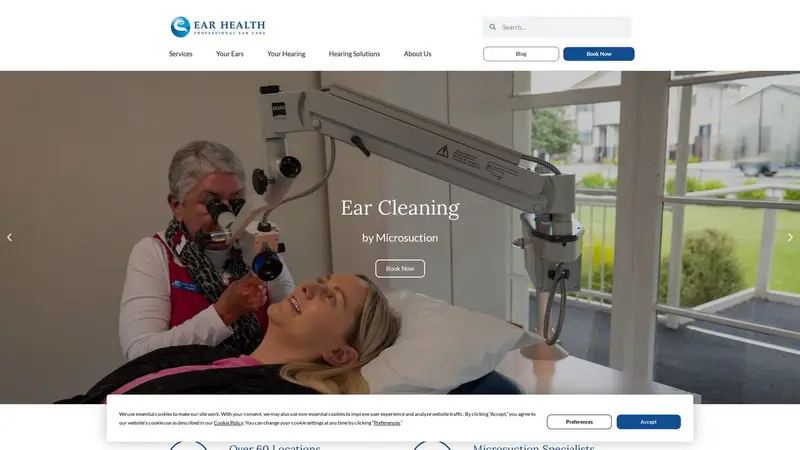
Homepage of earhealth.co.nz

Website report

Ear Health

earhealth.co.nz · Auckland

Assessed 3 June 2026. Part of our assessment of New Zealand websites.

C

Passes 15 of 21 checks

Checks we could not read are left out of the count.

The mirror

An AI read your website. Here's what it understood.

A multi-location healthcare provider offering earwax removal by microsuction, hearing tests, and hearing aid services across over 60 clinics in New Zealand. Founded in 1995, the company employs nurses and audiologists to deliver clinical ear care and audiology services.
  • Not found Phone number findable
  • Not found Email address findable
  • Found Address findable
  • Not found Contact form findable

What to fix

Most important first.

Phone number findable

AI Readiness Quick

We found no phone number on your homepage - an AI assistant asked for your number would come up empty.

Why it matters: People and AI assistants look for a number to call; if it is not on the page, the call goes to someone else.

How to fix it: Put your phone number on the homepage as text, ideally as a tap-to-call link.

Always-secure instruction (HSTS)

Domain & Security Technical

Your site does not tell browsers to always use the secure connection.

Why it matters: Without this instruction, a browser may still try the insecure address first, which leaves room for the connection to be tampered with.

How to fix it: Ask your developer or host to add the Strict-Transport-Security header once HTTPS works on every page.

AI guide file (llms.txt)

AI Readiness Quick

Your site does not publish an llms.txt file.

Why it matters: An llms.txt file is a short, plain summary of your business and key pages that AI assistants can read quickly and quote accurately.

How to fix it: Create a text file at /llms.txt with a one-paragraph description of your business and links to your most important pages.

Sitemap available

AI Readiness Quick

We found no sitemap for your site.

Why it matters: A sitemap lists every page you want found, so search engines and AI assistants do not miss the ones buried deep in your site.

How to fix it: Most website builders create a sitemap automatically; turn it on and list it in your robots.txt.

Email address findable

AI Readiness Quick

We found no email address on your homepage.

Why it matters: An address people can copy or tap is the simplest way for a customer to get in touch on their own time.

How to fix it: Add your contact email to the homepage as text or a mailto link.

Contact form findable

AI Readiness Quick

We found no contact form on your homepage.

Why it matters: A form lets a customer reach you at any hour without picking up the phone.

How to fix it: Add a simple contact form, or a clear link to one, on your homepage.
Domain & Security

6 of 7 checks passed

  • Pass

    Secure connection (HTTPS)

    Your homepage loads over a secure connection (https://www.earhealth.co.nz/).

  • Pass

    Valid security certificate

    Your site presents a valid security certificate.

  • Pass

    Certificate not about to expire

    Your certificate runs until 2026-09-29, well past our check on 2026-07-21.

  • Fail

    Always-secure instruction (HSTS)

    Your site does not tell browsers to always use the secure connection.

  • Not read

    Security headers

    We could not read this part of your site.

  • Pass

    Email sender record (SPF)

    Your domain publishes an SPF record listing who may send its email.

  • Pass

    Email protection policy (DMARC)

    Your domain publishes a DMARC policy.

  • Pass

    Domain receives email

    Your domain is set up to receive email.

AI Readiness

9 of 14 checks passed

  • Fail

    AI guide file (llms.txt)

    Your site does not publish an llms.txt file.

  • Pass

    Search and AI crawlers allowed

    Your site lets search engines and AI assistants read it.

  • Fail

    Sitemap available

    We found no sitemap for your site.

  • Pass

    Structured data

    Your homepage carries structured data (Answer, Article, FAQPage, ImageObject, Organization, Person, Question, SearchAction, WebPage, WebSite).

  • Pass

    Business described as a business

    Your structured data describes you as a business or organisation.

  • Pass

    Homepage title

    Your homepage has a title.

  • Pass

    Homepage description

    Your homepage has a meta description.

  • Pass

    One main heading

    Your homepage has a single main heading.

  • Pass

    Language declared

    Your homepage declares its language.

  • Pass

    Link preview when shared

    Your homepage has the tags for a full preview when it is shared.

  • Fail

    Phone number findable

    We found no phone number on your homepage - an AI assistant asked for your number would come up empty.

  • Fail

    Email address findable

    We found no email address on your homepage.

  • Pass

    Address findable

    We found an address on your homepage.

  • Fail

    Contact form findable

    We found no contact form on your homepage.

We already know your market

See where your business stands against its competitors - free.

My branch isn't here - we'll scrape your market for $7.

Assessed 3 June 2026 How we check websites Remove this report